Currently, accounts are only created by approved MaxLearn employees.
The following information is required to set up your account. The client can provide you with this information over the phone or in person or by filling out our online client facing form form:
https://zfrmz.com/7LiwiFzYwlOzqiM49vwG

| Required | Full name | First and last name of the account holder. |
| Required | Work email address | Work email address that will be used are part of login credentials |
| Optional | Back up contact | A backup contact for the account |
| Optional | Backup contact email | Work email for the backup contact |
| Required | Sub-domain name | Example: YourCompanyName.maxlearn.com |
| Optional | Company logo upload | |
| Optional | Industry | |
| Optional | Days of Operation | |
| Optional | Number of employees | |
| Optional | Timezone | |
| Required | sign off on Terms and ConPlease review our Terms of Service and Privacy policy. |
The MaxLearn employee entered client information in the following form:
MaxLearn - Admin Dashboard (maxlearn-adminqa.s3-website-us-east-1.amazonaws.com)
The account holder receives an email with the following information:
Welcome to MaxLearn!
Step 1: Set your password
Click on this link and set your password: [Link].
Step 2: Explore your account
We've created two custom links that will take you to your workspace:
- Admin link: https://admin.staging.maxlearn.com
- Learner link: https://app.staging.maxlearn.com
Step 3: Explore your account
Find and download the MaxLearn mobile app on Google Play or the Apple Store.
Additional steps:
For additional information and instruction, explore our Knowledgebase or refer to our Quick Start Guide.
MaxLearn comes pre-packaged with starter Compliance content and test users, allowing you to explore our capabilities before launching to learners.
Here's what you can look forward to on your MaxLearn journey:
- AI Content Assistant: Effortlessly transform pre-existing materials into effective training content.
- Spaced Repetition: This technique helps reinforce your learning by strategically spacing out content delivery.
- Engaging Challenges: Enjoy gamified elements that transform learning into an exciting adventure.
- Impactful Learning: Our approach is backed by adult learning theories, ensuring that your time spent on MaxLearn translates into valuable skills.
- Easy Progress Tracking: Track your progress and see your skills improve over time.
Please don't hesitate to reach out if you have any questions, feedback, or ideas to share. Your experience matters to us, and we're here to support you every step of the way.
Thank you for choosing MaxLearn for your learning needs. We can't wait to see the incredible strides you'll make!
Super Admin
1. Go to MaxLearn's Super Admin account.
2. Find the account that was created.
3. Enter the appropriate number of licenses.
4. Make Adjustments as needed.
Billing - Create a Subscription
1. Go to Zoho subscriptions.
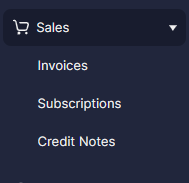
2. Under Sales, select Subscriptions.
3. Click New.

4. Either Select an existing customer or create new.
5. For product, select MaxLearn.
6. Enter the appropriate plan name, if the plan does not exist, create the plan under Product Catalog/Subcription items.
Was this article helpful?
That’s Great!
Thank you for your feedback
Sorry! We couldn't be helpful
Thank you for your feedback
Feedback sent
We appreciate your effort and will try to fix the article